Case study 01 Operations platform
Hired to track budgets. Expanded into building the systems behind the work.
A property management and development company was running on people's memory, paper, email and whiteboards. In about three months it moved to one shared operations platform, and office, field, finance and leadership staff were onboarded to it by role.
The demo is the platform's real interface running on invented data in your browser — no sign-in, database or e-mail.
- My role
- Business Operations Associate — product owner for the systems described here
- When
- June 2026 – present
- Company
- Property management and development; small office and field team
- Built with
- Google Sheets, Apps Script, then a web platform on PostgreSQL · AI implementation
In one minute
- Problem
- Job status, follow-ups and budgets lived in memory, paper, email and whiteboards. Project balances weren't reliable enough to plan from.
- Decisions
- Agree definitions in a spreadsheet before writing software. Enforce access in the database, not the menu. Release in small, gated steps and roll out one role at a time.
- Delivered
- An internal platform for work orders, maintenance, leases and rent, bank transactions, project balances and reports, with role-based home pages, two-factor sign-in and an audit trail.
- Outcome
- The old tools were retired and staff were onboarded by role. Impact is described from records and my own observation — it hasn't been measured.
- My part
- Requirements, workflow and screen design, priorities, directing AI implementation, testing and approving each release, onboarding and support.
The starting point
I was hired to handle budgeting on the project-development side. There was no operating framework to inherit and no formal onboarding, so the first job was understanding how work actually moved.
- Information was fragmented. Job status, vendor follow-ups and project details lived in people's memory, on paper, in personal task lists, in email and on whiteboards.
- Budgets were hard to rely on. An earlier tracking effort in a general-purpose tool didn't produce project balances leadership could plan from, and bank transactions and receipts were recorded inconsistently.
- No shared daily view. Leadership couldn't see, in one place, what needed to happen on each project today.
These were process gaps, not people problems — a small company growing faster than its systems.
How it unfolded
- Learn the business, start a written memory
Set up a documented knowledge base for decisions, definitions and open questions so nothing important depended on anyone's memory — including the AI assistants'.
- An operations command center in a spreadsheet
Designed a shared workbook: projects and budgets, reserve funds, a daily work queue and executive dashboards. It gave leadership one view for the first time, and let us validate definitions cheaply before writing software.
- A web interface for the office and phones
A web front end over the workbook went live, first read-only, then with work-order intake and controls.
- Internal operations platform released
Built from late July: a proper database with role-based access enforced by the database itself, two-factor sign-in and an audit trail of who changed what. Released for internal office use.
- The spreadsheet's work moved in; the old tool retired
Work orders were imported from the workbook, reconciled, and the old interface was archived read-only so there was one source of truth.
- Rolled out by role, improved from feedback
Colleagues were onboarded one role at a time — operations coordination, field, finance and leadership, compliance — while fixes and features shipped in small releases.
- Finance features people asked for
Expense categories on bank transactions, one-page project summaries, project-balance warnings, refunds, an Excel export and spending reports.
- From features to reliability
A watcher for the system's own scheduled jobs, released with its blind spots written down, and a records-retention policy that keeps business history while letting technical logs expire.
How the system works
One platform, organized around how the company works rather than around software modules:
Live for internal staff (October 2026)
- Work orders
- Maintenance intake
- Leases & rent
- Bank transactions
- Project balances
- Monthly budget requests
- Reports & Excel export
- Role home pages
- Two-factor sign-in
- Audit history
- Scheduled-job monitoring
- Personal workspaces. Each person lands on a page built for their job — a phone-first work queue, an assigned-work view for the field lead, a financial overview for finance, a leases view for compliance.
- Access by role, enforced by the database. Hiding a menu is never treated as security; every restriction is enforced server-side, and people can request extra access that an administrator approves.
- History you can trust. Every meaningful change records who did it and when, written by the system, never by the browser.
The platform today
Screens from the platform's own interface, running on a browser-local demonstration database with invented records. Company name, logo and people are replaced; nothing here is real data.
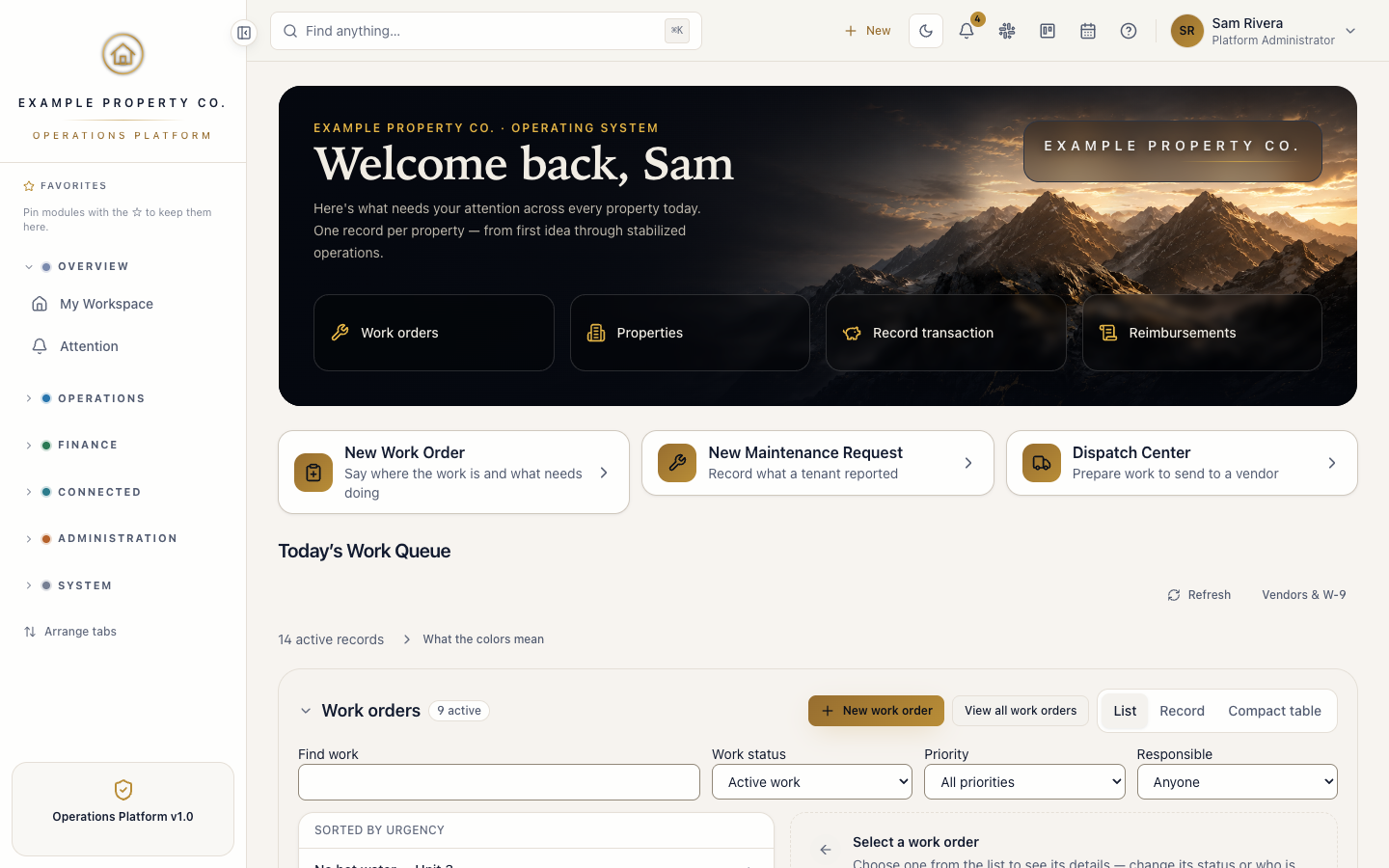
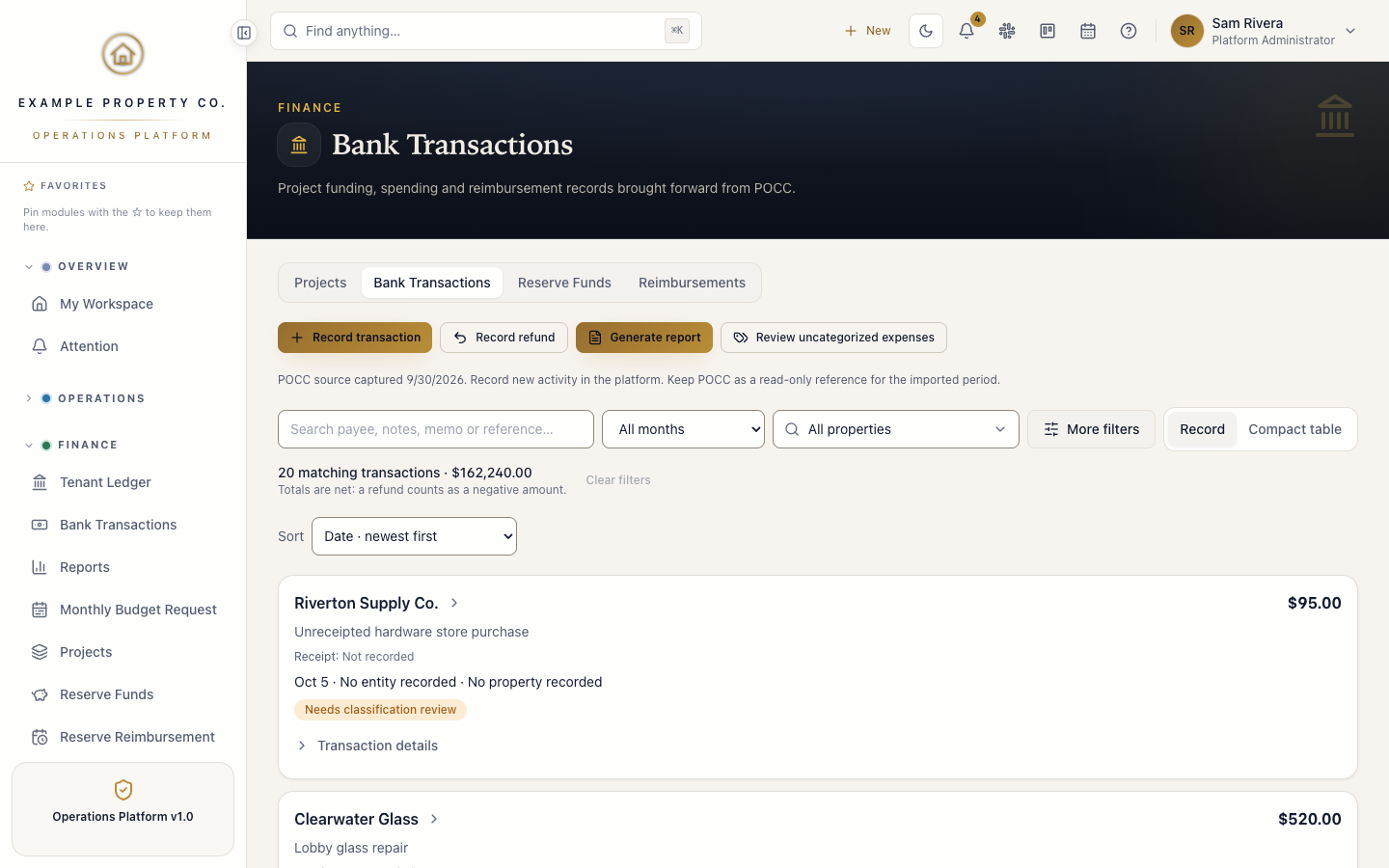
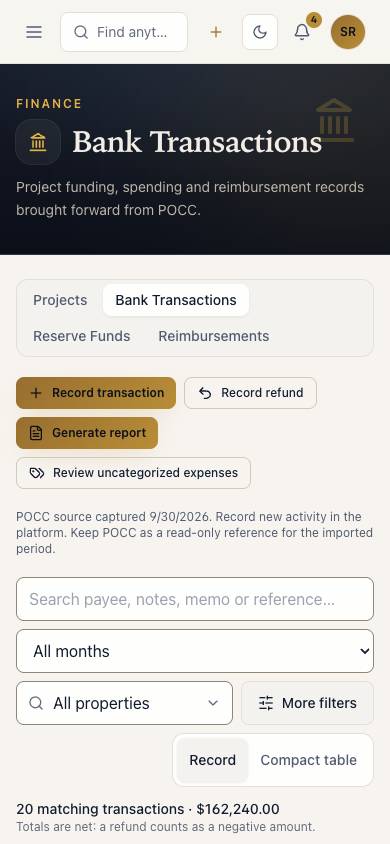
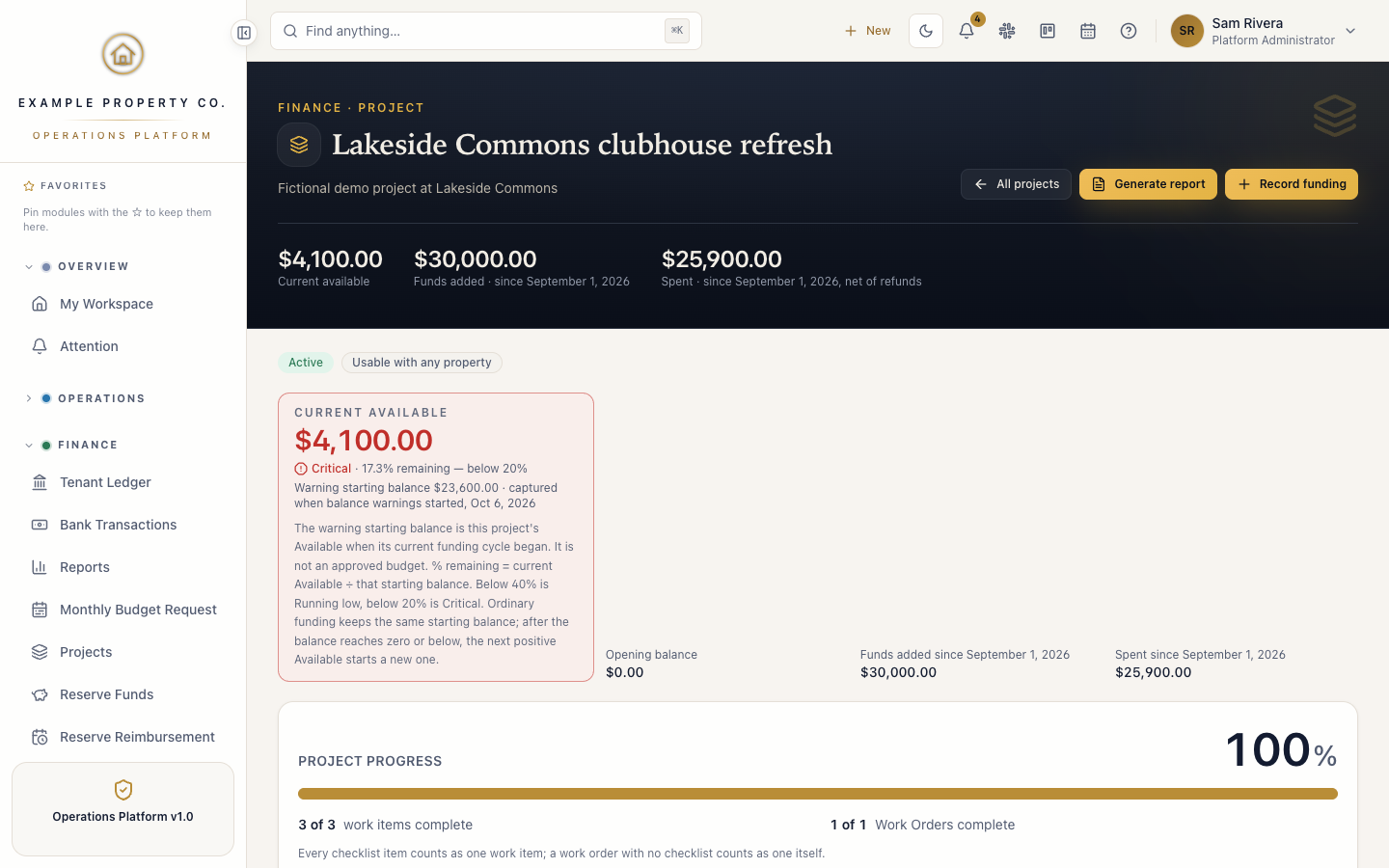
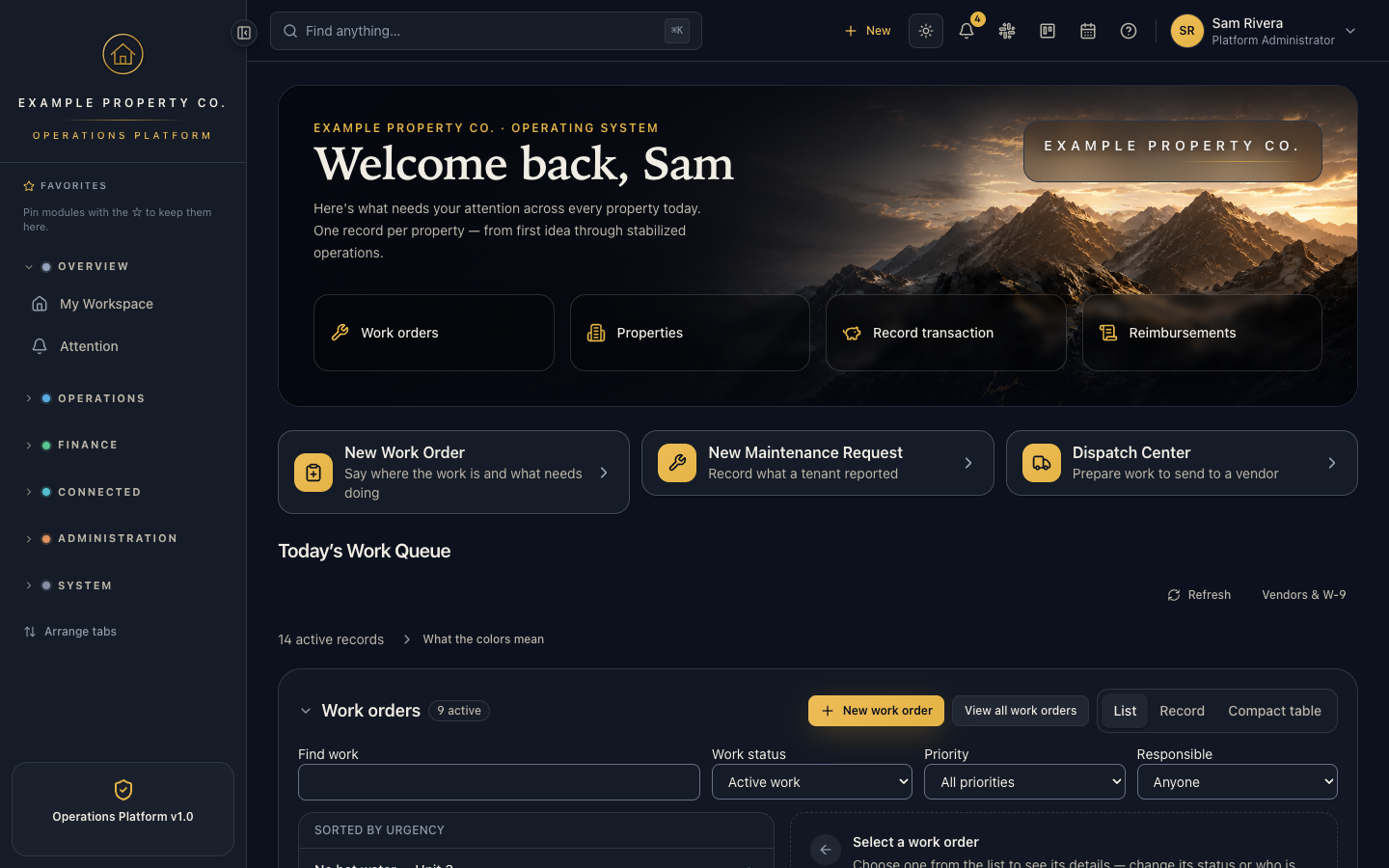
Open the live demo to use these screens — or the budget request demo. An earlier spreadsheet-backed web interface has been retired and isn't shown.
Who did what
AI wrote most of the code. The judgment about what to build, how it should behave and whether it was right enough to release was mine.
Me
- Problem framing and requirements
- Workflow, data and screen design
- Priorities and trade-offs
- Acceptance testing on real devices
- Release approval and rollout
- Onboarding and support
AI assistants
- Claude Code: implementation and automated tests, under my direction
- ChatGPT: strategy and planning partner
- Gemini: spreadsheet formulas in the early workbook
Colleagues
- Explained how the work really happens
- Reported problems from the field and office
- Leadership set priorities and approved access
Adoption and the feedback loop
Rollout happened one role at a time — operations coordination, field lead, finance and leadership, then compliance — each with their own sign-in, two-factor setup and home workspace.
The most useful work often came straight from users:
- A wrong assignment in the field was traced to a label that implied responsibility the data model didn't have. I fixed both — the wording and the model, so the responsible person is chosen when work is created.
- An access request went unnoticed because nothing notified the people who could approve it. The next day, requests notified exactly the administrators allowed to decide them.
- Unit navigation proved confusing while onboarding a new colleague. Two releases the same day made each unit open its current lease directly — and I accepted the change after testing it that afternoon.
- Training on the newer finance features. After a training session in October, the operations coordinator used them, including Bank Transactions, without problems. That's my report of one person's experience, not a measured result.
Results
- Delivered: one shared system replaced scattered sources for work orders, leases, rent, project balances and reports, and the old tools were retired.
- Adopted: office, field, finance and leadership staff were onboarded by role, each with their own sign-in and home page.
- Efficiency: in my observation colleagues work more efficiently, but it hasn't been measured, so I don't put a number on it.
- Scope: my responsibilities grew from budget tracking to owning the company's operating systems.
Limits and lessons
- Measure before you change. I didn't capture baselines early, so the impact is qualitative. For the next workflow I'll record tasks, follow-ups and time spent first.
- Say what a safeguard can't do. The job watcher runs inside the database, so it can't notice the scheduler itself stopping. That limit is written down and an outside check is planned, rather than calling the system fully monitored.
- Security is ongoing. An internal security assessment is published inside the product. It has not been independently reviewed; that review is planned before any external users.
- Prove definitions cheaply first. Starting in a spreadsheet let the company agree what a "project balance" means before it was built into software.
- AI speed needs discipline. Fast AI implementation only helped because every change was small, reviewed, verified and written down. How that works →
Evidence and attribution
Where each claim on this page comes from. "Record" means dated release records; "My report" is my own account, not independently measured; "Plan" is not done yet. Private records stay private — they're available to discuss in an interview.
| Claim | Source | Type |
|---|---|---|
| Starting conditions (fragmented information, unreliable balances, no daily view) | My account of the starting point | My report |
| Knowledge base started late June; spreadsheet command center in July | Dated project records | Record |
| Web interface live September 5; platform released September 17 | Dated release records | Record |
| Work orders imported and the old tool retired, September 23 | Dated release records | Record |
| Rollout by role; finance features Sept 29 – Oct 2; reliability work Oct 5 | Release history and onboarding records | Record |
| Operations coordinator used the newer finance features without problems after training | My account of one colleague's experience — not independently observed | My report |
| Job watcher's blind spot written down; outside check planned | Release records | Record Plan |
| Assignment fix, access-request notifications, unit navigation fix | Dated release records; the last also accepted by me | Record |
| Colleagues working more efficiently | My observation — not measured | My report |
| Platform screenshots | The platform's interface on a browser-local demonstration database; invented data; branding and names replaced | Record |